Migrating PostgreSQL in Kubernetes: A Homelab Christmas Adventure
Introduction
In a Production environment, upgrading databases is arguably one of the most critical and nerve-wracking tasks a DevOps or SRE team has to face. We all know someone (or are someone) who has a war story about a "simple" upgrade turning into a lost weekend spent recovering data.
In the era of Kubernetes, this pressure is compounded because the release velocity is so fast; you're often looking at a major version upgrade every 1 to 1.5 years. That is exactly why, in every company I’ve worked for, I always suggest using DB as a Service (like AWS RDS). Offload that pain to the cloud provider so you can sleep at night.
However, in my Homelab (Datahub.local), I don't have that luxury (and the budget!). So, this holiday season, it was finally time to bite the bullet and upgrade my PostgreSQL cluster running on CloudNativePG (CNPG).
The Challenge: It's Not Just One Version
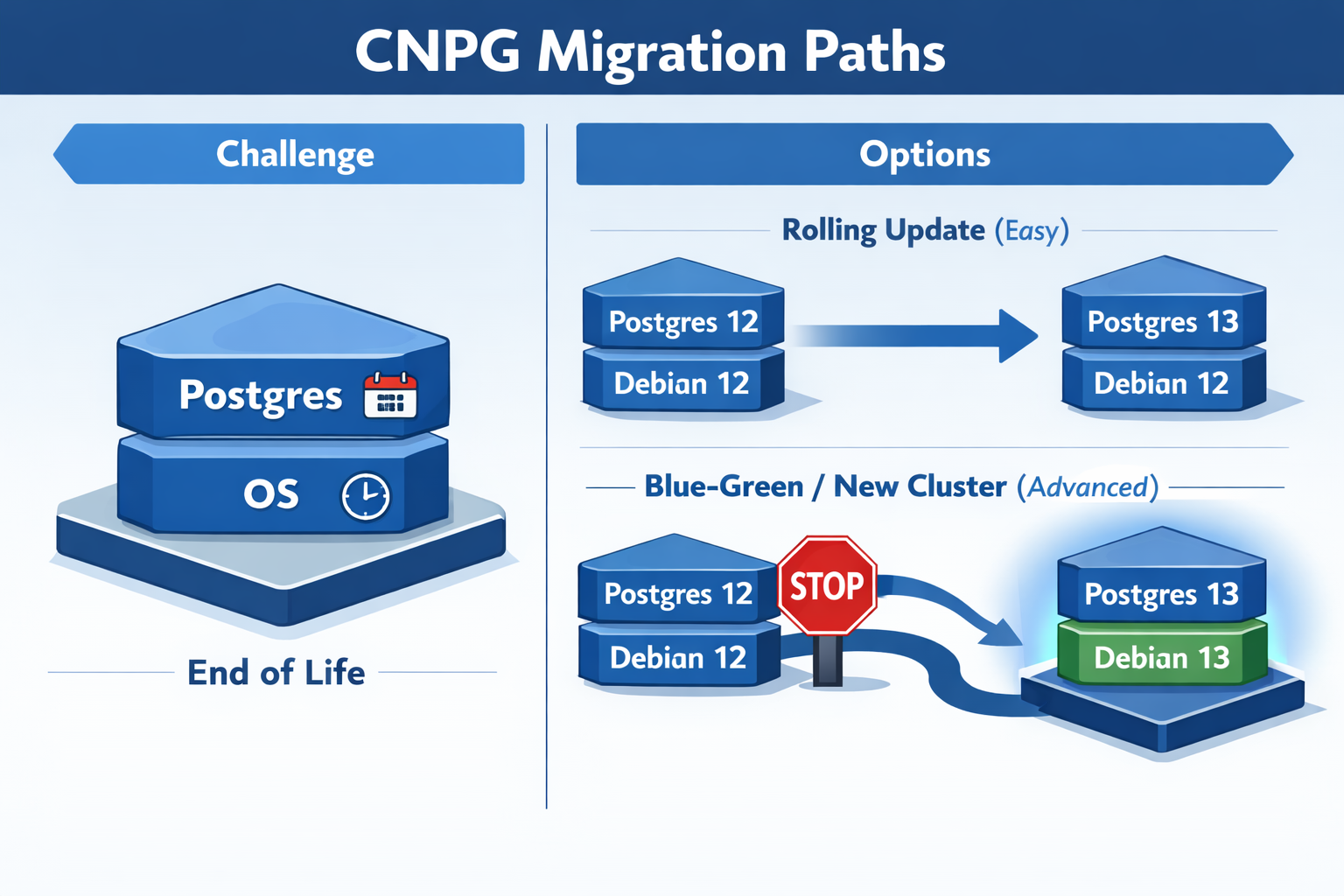
Before diving into the "how," it's important to understand that with CloudNativePG, you aren't just managing one version. You are juggling two: 1. The PostgreSQL Version 2. The OS Version of the container image (usually Debian based)
Both have different End-of-Life (EOL) dates that you need to watch out for.
PostgreSQL EOLs:
| Version | Release Date | EOL |
|---|---|---|
| 18 | 2025-09-25 | 2030-11-14 |
| 17 | 2024-09-26 | 2029-11-08 |
| 16 | 2023-09-14 | 2028-11-09 |
Debian OS EOLs:
| Name | Status | EOL |
|---|---|---|
| Trixie (stable) | Supported | 2030-06-30 |
| Bookworm (oldstable) | Supported | 2028-06-30 |
| Bullseye | Deprecated | 2026-08-31 |
Depending on what you need to upgrade, the difficulty level changes exponentially.
More info on that can be found in the CNPG PostgreSQL Container Images.
Rolling Update: Level Easy (Postgres Only)
If you stick to the same OS, upgrading Postgres is trivial. You can go from Postgres 16 to 17 just by changing the image tag.
Rolling Update means CNPG gradually replaces one pod at a time while maintaining the cluster's availability—no downtime, no data movement needed.
apiVersion: postgresql.cnpg.io/v1
kind: Cluster
metadata:
  name: pg-cluster
spec:
  # Changing from 16 to 17 on the same OS (Bookworm)
  image: ghcr.io/cloudnative-pg/postgresql:17-system-bookworm
  instances: 3
  storage:
    size: 1Gi
Blue-Green Update: Level Advanced (Postgres + OS)
This is where I found myself. I wanted to move from Postgres 16 on Bookworm to Postgres 17 on Trixie.
Here's the catch: You cannot do a direct rolling upgrade if the underlying OS changes. The glibc versions or other system libraries might differ, making the data directory incompatible or risky to upgrade in place.
Blue-Green Update is the solution—you deploy an entirely new cluster alongside the old one, migrate data, then switch traffic over. This approach is safer when OS components differ, and it gives you a quick rollback option if issues arise.
My Migration Strategy
Since I wanted the latest and greatest (and to reset the clock on those EOL dates), I opted for the advanced path. Here is the workflow I used to migrate with zero downtime for my apps.
Step 1: The Abstraction Layer
First, I created a Kubernetes Service of type ExternalName. This acts as a pointer. I configured all my applications to talk to this Service (pg-cluster-entrypoint) instead of the actual CNPG service name.
This is crucial because it decouples the "address" my apps use from the actual cluster running behind the scenes.
apiVersion: v1
kind: Service
metadata:
  name: "pg-cluster-entrypoint"
spec:
  type: ExternalName
  # Pointing to the CURRENT Postgres 16 cluster
  externalName: 'pg-cluster-rw.postgres.svc.cluster.local'
  ports:
    - name: postgres
      port: 5432
      protocol: TCP
      targetPort: postgres
Step 2: The New Cluster
Next, I spun up a completely new cluster running Postgres 17 on Trixie. I used the bootstrap.initdb.import feature to pull data directly from the old cluster. More info on that can be found in the CloudNativePG docs.
apiVersion: postgresql.cnpg.io/v1
kind: Cluster
metadata:
  name: pg-cluster-17
spec:
  image: ghcr.io/cloudnative-pg/postgresql:17-system-trixie
  instances: 3
  bootstrap:
    initdb:
      import:
        type: monolith
        databases:
          - "*"
        roles:
          - "*"
        source:
          externalCluster: old-pg-cluster
        pgDumpExtraOptions:
          - --no-privileges
  storage:
    size: 1Gi
  externalClusters:
    - name: old-pg-cluster
      connectionParameters:
        # Connect to the OLD cluster
        host: pg-cluster-rw.postgres.svc.cluster.local
        user: postgres
        dbname: postgres
        sslmode: require
      password:
        name: pg-cluster-superuser
        key: password
This creates a fresh cluster that starts life as a clone of the old one.
Step 3: The Switchover
Once the new cluster was healthy and the data was synced, the magic happened. I simply updated the ExternalName service to point to the new cluster.
apiVersion: v1
kind: Service
metadata:
  name: "pg-cluster-entrypoint"
spec:
  type: ExternalName
  # Update DNS to point to the NEW Postgres 17 cluster
  externalName: 'pg-cluster-17-rw.postgres.svc.cluster.local'
  ports:
    - name: postgres
      port: 5432
      protocol: TCP
      targetPort: postgres
My applications started resolving the DNS to the new IP, and the migration was complete. I verified everything was working, and then decommissioned the old cluster.
Conclusion
While upgrading databases in a Homelab doesn't carry the same financial risk as production, it’s a great playground to practice these "Advanced Level" patterns. Using an ExternalName service as a stable interface allowed me to swap the underlying infrastructure without having to reconfigure a single application.
The process was surprisingly smooth, and now I'm set with the latest Postgres and OS versions for years to come. Hope this helps anyone else planning their holiday upgrades!
Happy New Year 2025! 🎉