DevOps

Migrating PostgreSQL in Kubernetes: A Homelab Christmas Adventure

Introduction

In a Production environment, upgrading databases is arguably one of the most critical and nerve-wracking tasks a DevOps or SRE team has to face. We all know someone (or are someone) who has a war story about a "simple" upgrade turning into a lost weekend spent recovering data.

In the era of Kubernetes, this pressure is compounded because the release velocity is so fast; you're often looking at a major version upgrade every 1 to 1.5 years. That is exactly why, in every company I’ve worked for, I always suggest using DB as a Service (like AWS RDS). Offload that pain to the cloud provider so you can sleep at night.

However, in my Homelab (Datahub.local), I don't have that luxury (and the budget!). So, this holiday season, it was finally time to bite the bullet and upgrade my PostgreSQL cluster running on CloudNativePG (CNPG).

The Challenge: It's Not Just One Version
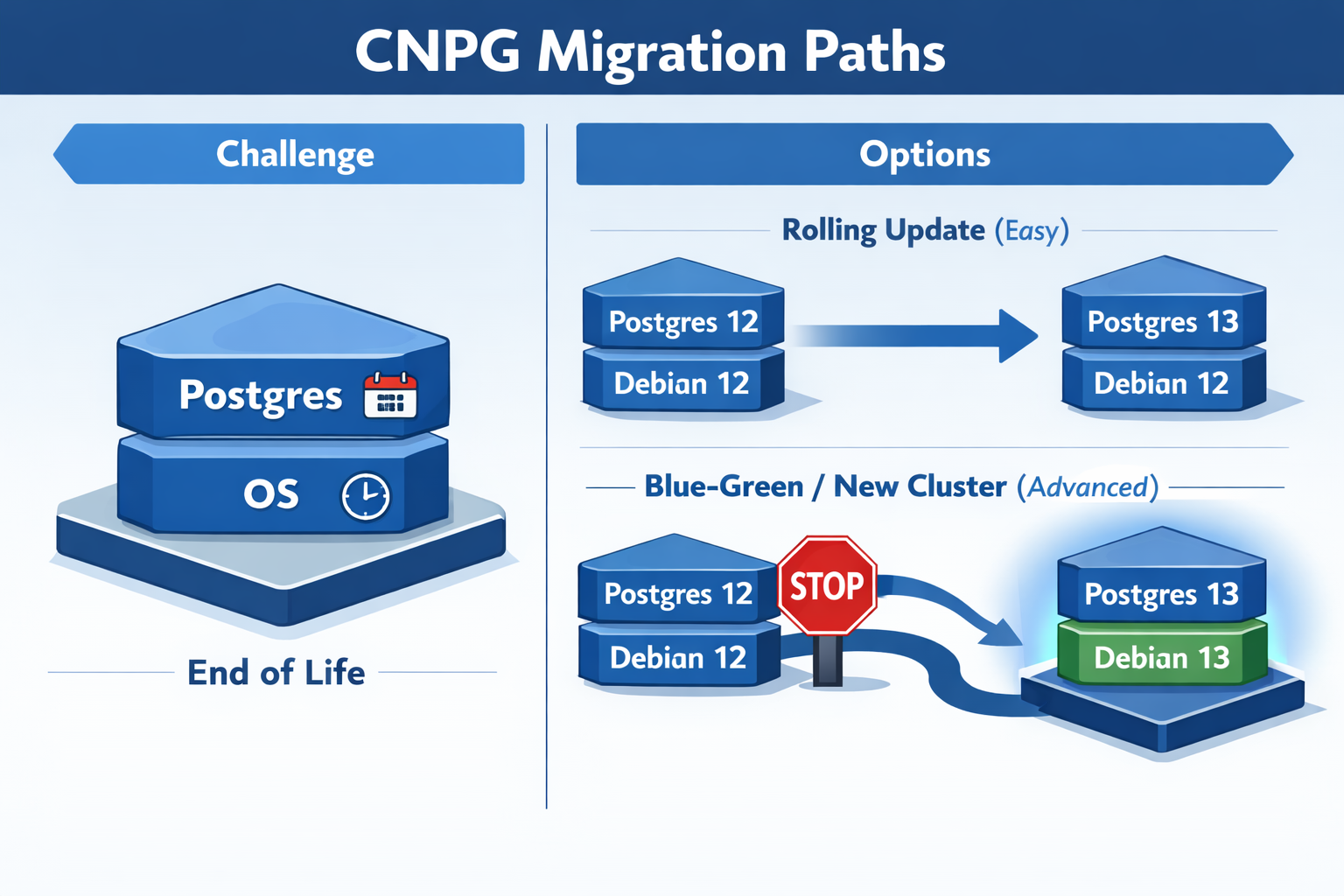
CNPG Upgrade Infographic

Before diving into the "how," it's important to understand that with CloudNativePG, you aren't just managing one version. You are juggling two: 1. The PostgreSQL Version 2. The OS Version of the container image (usually Debian based)

Both have different End-of-Life (EOL) dates that you need to watch out for.

PostgreSQL EOLs:

Version Release Date EOL
18 2025-09-25 2030-11-14
17 2024-09-26 2029-11-08
16 2023-09-14 2028-11-09

Debian OS EOLs:

Name Status EOL
Trixie (stable) Supported 2030-06-30
Bookworm (oldstable) Supported 2028-06-30
Bullseye Deprecated 2026-08-31

Depending on what you need to upgrade, the difficulty level changes exponentially.

More info on that can be found in the CNPG PostgreSQL Container Images.

Rolling Update: Level Easy (Postgres Only)

If you stick to the same OS, upgrading Postgres is trivial. You can go from Postgres 16 to 17 just by changing the image tag.

Rolling Update means CNPG gradually replaces one pod at a time while maintaining the cluster's availability—no downtime, no data movement needed.

apiVersion: postgresql.cnpg.io/v1
kind: Cluster
metadata:
  name: pg-cluster
spec:
  # Changing from 16 to 17 on the same OS (Bookworm)
  image: ghcr.io/cloudnative-pg/postgresql:17-system-bookworm 
  instances: 3
  storage:
    size: 1Gi

Blue-Green Update: Level Advanced (Postgres + OS)

This is where I found myself. I wanted to move from Postgres 16 on Bookworm to Postgres 17 on Trixie.

Here's the catch: You cannot do a direct rolling upgrade if the underlying OS changes. The glibc versions or other system libraries might differ, making the data directory incompatible or risky to upgrade in place.

Blue-Green Update is the solution—you deploy an entirely new cluster alongside the old one, migrate data, then switch traffic over. This approach is safer when OS components differ, and it gives you a quick rollback option if issues arise.

My Migration Strategy

Since I wanted the latest and greatest (and to reset the clock on those EOL dates), I opted for the advanced path. Here is the workflow I used to migrate with zero downtime for my apps.

Step 1: The Abstraction Layer

First, I created a Kubernetes Service of type ExternalName. This acts as a pointer. I configured all my applications to talk to this Service (pg-cluster-entrypoint) instead of the actual CNPG service name.

This is crucial because it decouples the "address" my apps use from the actual cluster running behind the scenes.

apiVersion: v1
kind: Service
metadata:
  name: "pg-cluster-entrypoint"
spec:
  type: ExternalName
  # Pointing to the CURRENT Postgres 16 cluster
  externalName: 'pg-cluster-rw.postgres.svc.cluster.local'
  ports:
    - name: postgres
      port: 5432
      protocol: TCP
      targetPort: postgres

Step 2: The New Cluster

Next, I spun up a completely new cluster running Postgres 17 on Trixie. I used the bootstrap.initdb.import feature to pull data directly from the old cluster. More info on that can be found in the CloudNativePG docs.

apiVersion: postgresql.cnpg.io/v1
kind: Cluster
metadata:
  name: pg-cluster-17
spec:
  image: ghcr.io/cloudnative-pg/postgresql:17-system-trixie
  instances: 3
  bootstrap:
    initdb:
      import:
        type: monolith
        databases:
          - "*"
        roles:
          - "*"
        source:
          externalCluster: old-pg-cluster
        pgDumpExtraOptions:
          - --no-privileges
  storage:
    size: 1Gi
  externalClusters:
    - name: old-pg-cluster
      connectionParameters:
        # Connect to the OLD cluster
        host: pg-cluster-rw.postgres.svc.cluster.local
        user: postgres
        dbname: postgres
        sslmode: require
      password:
        name: pg-cluster-superuser
        key: password

This creates a fresh cluster that starts life as a clone of the old one.

Step 3: The Switchover

Once the new cluster was healthy and the data was synced, the magic happened. I simply updated the ExternalName service to point to the new cluster.

apiVersion: v1
kind: Service
metadata:
  name: "pg-cluster-entrypoint"
spec:
  type: ExternalName
  # Update DNS to point to the NEW Postgres 17 cluster
  externalName: 'pg-cluster-17-rw.postgres.svc.cluster.local'
  ports:
    - name: postgres
      port: 5432
      protocol: TCP
      targetPort: postgres

My applications started resolving the DNS to the new IP, and the migration was complete. I verified everything was working, and then decommissioned the old cluster.

Conclusion

While upgrading databases in a Homelab doesn't carry the same financial risk as production, it’s a great playground to practice these "Advanced Level" patterns. Using an ExternalName service as a stable interface allowed me to swap the underlying infrastructure without having to reconfigure a single application.

The process was surprisingly smooth, and now I'm set with the latest Postgres and OS versions for years to come. Hope this helps anyone else planning their holiday upgrades!

Happy New Year 2025! 🎉
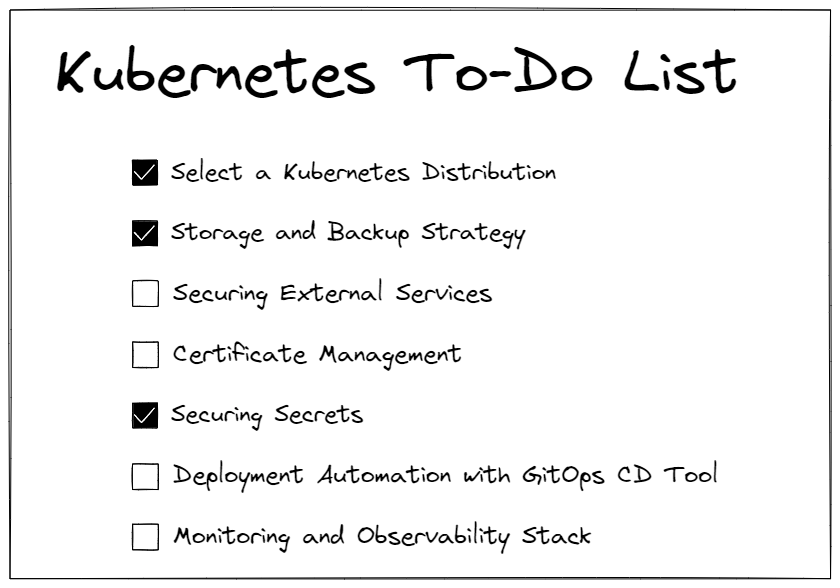
Yet Another Kubernetes To-Do List

Ever noticed how easy it is to kickstart your app on Kubernetes locally? Just a couple of commands and boom – it's up and running! But let's face it, real-world setups are a whole different ball game.

Take my Datahub.local project, for example. It's not just a data platform; it's a whole ecosystem of things running on Kubernetes. I've also got monitoring, storage solutions, CI/CD pipelines and many more. So suddenly, The initial simplicity feels like a distant dream.

Kubernetes To-Do List

1. Select a Kubernetes Distribution

Choosing the right Kubernetes distribution is crucial, especially considering your specific needs and infrastructure requirements. Options range from full-fledged, self-managed distributions like vanilla Kubernetes to lightweight solutions tailored for low-end devices.

  • Vanilla: Ideal for environments where customization and control are paramount, vanilla Kubernetes offers the flexibility to tailor the cluster to your exact specifications. However, it may require more manual configuration and maintenance efforts.
  • Managed: Platforms like Google Kubernetes Engine (GKE), Amazon Elastic Kubernetes Service (EKS), and Microsoft Azure Kubernetes Service (AKS) provide fully managed Kubernetes clusters, abstracting away much of the underlying infrastructure management. They're great for teams looking to offload operational overhead and focus on application development.
  • Enterprise: Solutions like Red Hat OpenShift, Rancher or VMware Tanzu offer enterprise-grade features and support, making them suitable for organizations with complex deployment requirements and regulatory compliance needs.
  • Lightweight: For resource-constrained environments or low-end devices, lightweight Kubernetes distributions like K3s or MicroK8s are excellent choices. k3s is optimized for production workloads in resource-constrained environments, while MicroK8s provides a lightweight, easy-to-install Kubernetes for development and testing purposes. These distributions offer reduced resource overhead and simplified installation, making them ideal for edge computing or IoT deployments.

Consider factors such as ease of deployment, scalability, support, and compatibility with your existing infrastructure when evaluating Kubernetes distributions. Choose the one that best fits your project requirements and long-term goals, ensuring a smooth and efficient Kubernetes deployment experience.

2. Storage and Backup Strategy

Now it's time to review storage and backup – the backbone of our data resilience. Now, when it comes to picking the right storage solutions, we've got some solid options on the table. Longhorn and Rook/Ceph are likely your best bets for storage services.

Think of Longhorn as your go-to buddy for block storage. It's sleek, easy to use, and packs a punch when it comes to reliability. With features like built-in backup and restore capabilities, it's like having a safety net for your critical data.

Now, if you're into distributed file systems, Rook/Ceph is the big name of the market. It's like having your own personal cloud storage solution right in your Kubernetes cluster including its own S3 compatible solution. Plus, with Rook's seamless integration with Kubernetes, setting up and managing Ceph clusters becomes a breeze.

So, whether you're storing mission-critical databases or hosting media files for your next big app, Longhorn and Rook/Ceph have got you covered. Keep your data safe, keep it resilient.

3. Securing External Services

Alright, let's talk about locking down those external services trying to cozy up with your Kubernetes cluster. You don't want just anyone waltzing in and causing chaos, right?

So, first things first, let's beef up that security. Consider using an Ingress controller with TLS termination. You are ensuring encrypted communication between your services and the outside world. Plus, it adds that extra layer of protection against eavesdroppers.

Now, onto authentication – because not everyone should get access. OAuth2 Proxy can be your best friend here. Think of them as the gatekeepers who verify everyone's credentials before they're allowed in. With an OAuth2 Proxy you can use providers like Google, Github, Keycloak or Dex, you can enforce user authentication and authorization policies, making sure only authorized users can interact with your services.

But wait, there's more! Ever heard of Cloudflare Tunnel? It's like your service's secret agent, keeping it hidden from prying eyes on the internet. Instead of exposing your services directly, Cloudflare Tunnel acts as a secure conduit, routing traffic through Cloudflare's network without exposing your server's IP address.

4. Certificate Management

What about managing certificates in Kubernetes? Cert-Manager's got your back. It's like your personal assistant for all things TLS certificates. With Cert-Manager, you can automate the whole shebang – issuing, renewing, and revoking certificates – without breaking a sweat.

Oh, and here's a pro tip: even for your local setups, consider using your own domain. Yeah, I know it sounds fancy, but trust me, it's worth it. It keeps things consistent across all environments, from local to production.

5. Securing Secrets

Keeping your sensitive data safe is like guarding the treasure chest of your app. With Kubernetes, you've got options aplenty for secret storage. You could start with the classic vanilla Secrets, where your secrets are stored in your cluster's etcd database. It gets the job done, but it's like hiding your keys under the doormat – not the most secure option out there.

If you want to step up your game, consider Sealed Secrets. Think of them as secret messages locked tight with encryption, so even if someone snoops around, they can't make heads or tails of your precious data.

Then there's External Secrets, where you outsource secret management to specialized tools like HashiCorp Vault or AWS Secrets Manager. It's like having a super-secure vault guarded by dragons – nobody's getting in without the right keys.

No matter which route you choose, make sure to encrypt your secrets at rest and in transit. Rotate them regularly like changing the combination on a safe, and you'll sleep soundly knowing your secrets are safe and sound.

6. Deployment Automation with GitOps CD Tool

Say goodbye to manual deployment headaches and hello to streamlined automation with GitOps Continuous Delivery (CD) tools like Flux and Argo CD. These tools take the hassle out of managing Kubernetes resources by syncing your cluster state with version-controlled Git repositories.

With Flux, you can define your desired cluster state in Git and let Flux automatically apply those changes to your cluster, keeping everything in sync effortlessly. It's like having a trusty assistant who ensures your applications are always up-to-date without you lifting a finger.

On the other hand, Argo CD provides a slick user interface for visualizing and managing your Kubernetes applications. Simply declare your desired state in Git, and Argo CD will continuously monitor your repository for changes, automatically applying them to your cluster. It's like having a personal Kubernetes concierge, always ready to cater to your deployment needs.

Whether you prefer Flux's simplicity or Argo CD's user-friendly interface, embracing GitOps principles with these CD tools will revolutionize your deployment workflows, making them smoother, more reliable, and ultimately more enjoyable.

7. Monitoring and Observability Stack

Next thing you want to keep a close eye on is what's happening in your Kubernetes cluster, right?

First up, we've got the kube-prometheus-stack. It's like your Swiss Army knife for Kubernetes monitoring. With Prometheus for metrics and Grafana for visualization, it's a powerhouse combo that gives you all the insights you need into your cluster's health and performance. Besides, you can install Loki for logs aggregation.

But hey, maybe you're not into managing all that yourself. No worries! There are some fantastic SaaS options like Datadog and Dynatrace. These guys handle all the heavy lifting for you, giving you top-notch monitoring and observability without the hassle of managing your own stack.

Plus, there are tools like Robusta which can help automate essential SRE actions, saving you time and headaches.

So whether you choose one or another depends on free cost or prefer the convenience of a managed service, there's something out there to suit your monitoring needs.