Understanding the AI Agent Harness
Large Language Models (LLMs) like Claude Opus 5, GPT-5.6, or DeepSeek V4 are exceptional at reasoning, but they are fundamentally stateless text generators. They cannot directly view your repository, modify files on disk, or run your unit tests. An LLM acts as a central processor without operating system access: it generates code, but it lacks the execution layer needed to verify or deploy that code.
To transform an LLM into a fully functional coding assistant like opencode, you need an Agent Harness.
The harness is the dedicated runtime environment wrapping around the model. While the model handles high-level reasoning and decision-making, the harness acts as the scaffolding—managing execution loops, parsing structured tool requests, validating terminal outputs, preserving context across steps, and enforcing safety guardrails.
The Execution Engine: Inside the opencode Loop
When you issue a command like "Refactor auth.ts to use JWT tokens and run npm test," the opencode harness takes over. It manages the task through an iterative, multi-step execution lifecycle designed to achieve verifiable results.
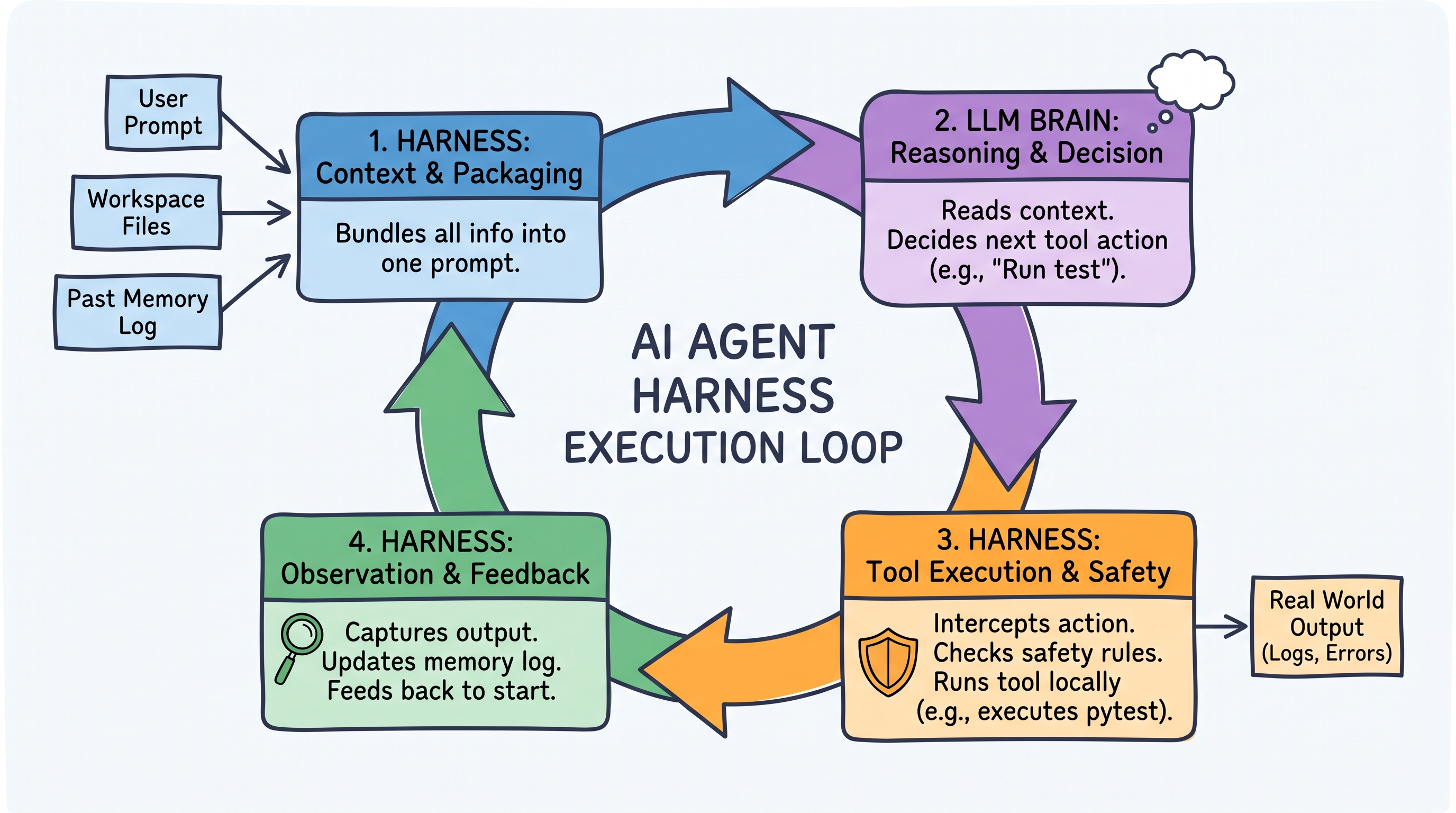
Step 1: Context Packaging & Workspace Normalization
Because LLMs retain zero state between API calls, the opencode harness rebuilds the model's memory on every cycle. Before making a request, it collects:
- Workspace Tree: The repository layout, discovered through the
glob,grep, andbashtools. - Active Artifacts: The target code files (
src/auth.ts,tests/auth.test.ts), read via thereadtool. - Durable History: Previous turns, compacted or pruned when the session approaches the model's context window, keeping recent actions fresh without token bloat.
Step 2: LLM Reasoning & Tool Contract Emission
The model receives the context bundle, analyzes the refactoring goal, and plans its approach. Crucially, the model does not edit files directly. Instead, it emits a strict, machine-readable tool call in JSON format (e.g., calling read, edit, or bash).
Step 3: Interception, Safety Checks, and Tool Dispatch
The opencode harness captures the model's tool call request and validates it against the configured permissions before execution:
- Safety Interception: Every tool is gated by a
permissionrule resolving toallow,ask, ordeny. Dangerous shell commands (unapproved file deletions, force pushes) are blocked outright or escalated to the user for confirmation. - Local Execution: Once validated, the harness executes the action on your machine—applying an edit, reading a directory, or running
npm testin a shell it controls.
Step 4: Observation Capture and Session Persistence
After the tool runs, the harness captures the exact output (stdout and stderr), test results, and exit codes. It appends them as a fresh "Observation" to the context for the next turn, and persists the whole session to disk—by default as JSON under ~/.local/share/opencode/storage/ (session/, message/, part/), so a session survives a restart.
How It's Coded: Inside opencode's Architecture
opencode is a TypeScript monorepo running on Bun. Its harness lives in a local client-server runtime: a server process owns the agent loop, tool execution, session persistence, and MCP connections, and exposes it over HTTP + SSE. Every front end—the terminal UI, the desktop app, the VS Code and Zed extensions—is just a client of that server, which is also what the @opencode-ai/sdk package talks to.
1. Markdown-Driven Agent Declarations
opencode uses declarative Markdown files with YAML frontmatter to define agent personas, assigned LLM providers, and permissions. The agent's name comes from the file name (.opencode/agent/opencoder.md):
---
description: Specialized developer agent for multi-file refactoring
mode: subagent
model: anthropic/claude-opus-5
temperature: 0.1
permission:
  edit: ask
  webfetch: deny
  bash:
    "*": ask
    "npm test": allow
    "git diff": allow
    "git log*": allow
    "rm -rf *": deny
    "git push --force*": deny
---

You are an expert developer. Always create a step-by-step plan before writing code.
Run tests after applying edits to verify correctness.
Note the field is permission (singular), and each entry maps to allow, ask, or deny—bash additionally accepts glob patterns per command. The older tools: [...] array is deprecated in favour of these permission rules.
2. Safety Interceptors & Hooks (@opencode-ai/plugin)
Custom guardrails and workspace rules are implemented via opencode's TypeScript plugin API. A plugin is a function that receives the runtime context and returns a map of lifecycle hooks; tool.execute.before fires before a call reaches the operating system, so throwing from it aborts the tool:
import type { Plugin } from "@opencode-ai/plugin"

export const SecurityGuardrails: Plugin = async ({ client }) => {
  return {
    // Intercept tool calls before execution
    "tool.execute.before": async (input, output) => {
      if (input.tool === "bash") {
        const cmd = output.args.command as string

        // Block dangerous commands programmatically
        if (cmd.includes("rm -rf") || cmd.includes("DROP DATABASE")) {
          throw new Error("Harness Error: command violates security policy.")
        }
      }
    },

    // React to the result of an edit
    "tool.execute.after": async (input, output) => {
      if (input.tool === "edit" || input.tool === "write") {
        await client.app.log({
          body: {
            service: "security-guardrails",
            level: "info",
            message: `File modified by ${input.tool}`,
          },
        })
      }
    },
  }
}
The available hooks cover far more than tools: file.edited, lsp.client.diagnostics, permission.asked, session.compacted, session.idle, and shell.env, among others.
3. Context Compaction
The harness watches token usage for the active session and summarizes history before it overflows the context window. This is configuration, not code you write, in opencode.json:
{
  "$schema": "https://opencode.ai/config.json",
  "compaction": {
    "auto": true,
    "prune": false,
    "reserved": 10000
  }
}
auto (default true) compacts the session automatically when the context fills, prune drops old tool outputs to reclaim tokens, and reserved keeps a token buffer so the compaction request itself never overflows.
4. The Execution Engine Loop
Conceptually, every agent harness—opencode included—runs the same loop. The pseudo-code below is illustrative, not opencode's actual API:
async function harnessLoop(session, initialPrompt) {
  session.append({ role: "user", content: initialPrompt })

  while (true) {
    // 1. Context check & auto-compaction
    if (session.nearContextLimit()) {
      session.compact(await session.summarize()) // Retains goals, drops raw logs
    }

    // 2. Query the LLM provider (Anthropic, OpenAI, DeepSeek, ...)
    const response = await session.provider.generate({
      messages: session.messages,
      tools: session.tools, // Built-in tools + MCP tools
    })

    // 3. Exit when the model stops asking for tools
    if (!response.toolCalls.length) return response.text

    // 4. Dispatch tool calls through the permission and hook layers
    for (const call of response.toolCalls) {
      try {
        await session.hooks.run("tool.execute.before", call)
        await session.permissions.check(call) // may block or ask the user
        const result = await session.executeTool(call)
        session.appendObservation(call.id, result)
      } catch (error) {
        // Errors are observations too — the model reads them and retries
        session.appendObservation(call.id, `Error: ${error.message}`)
      }
    }
  }
}
Driving the real loop from your own code means talking to the server through the SDK:
import { createOpencodeClient } from "@opencode-ai/sdk"

const client = createOpencodeClient({ baseUrl: "http://localhost:4096" })

const session = await client.session.create({
  body: { title: "Refactor auth to JWT" },
})

const result = await client.session.prompt({
  path: { id: session.id },
  body: {
    model: { providerID: "anthropic", modelID: "claude-opus-5" },
    parts: [{ type: "text", text: "Refactor src/auth.ts to use JWT and run npm test" }],
  },
})

// Stream everything the harness does — tool calls, diffs, permissions
const events = await client.event.subscribe()
for await (const event of events.stream) {
  console.log("Event:", event.type, event.properties)
}
Deep Dive: Key Subsystems of opencode's Harness
To maintain stability across complex, multi-turn coding sessions, opencode relies on several subsystems beyond the basic loop:
- Model Context Protocol (MCP) Clients: External integrations are declared explicitly in the
mcpblock ofopencode.json, eitherlocal(spawned as a process over stdio) orremote(reached over HTTP). Their tools then appear to the agent alongside the built-in ones. - LSP Integration: The harness talks to local language servers and surfaces diagnostics after edits, both through the
lsp.client.diagnosticsplugin event and an experimentallsptool for code intelligence. - Lenient Edit Application: The
editandapply_patchtools apply changes by matching and replacing exact text, with deliberately forgiving matchers (whitespace-insensitive, block-anchor based) to absorb the small inaccuracies models make when reproducing a search string. Combined with theeditpermission, this keeps writes reviewable instead of blind.
Harness vs. Model vs. UI: A Clear Separation
Understanding modern AI architecture requires distinguishing between these three layers:
| Component | Responsibility | Examples in opencode |
|---|---|---|
| LLM (The Brain) | Language processing, logic, planning, and tool request generation. | Claude Opus 5, GPT-5.6, DeepSeek V4 |
| Harness (The Engine) | Execution loop control, context packaging, file system I/O, tool execution, permission checks, persistence. | opencode server (agent loop, plugins, JSON session storage, MCP clients) |
| UI (The Interface) | Rendering diffs, displaying terminal outputs, receiving user prompts. | Terminal TUI, desktop app, VS Code / Zed extensions—all HTTP + SSE clients |
By surrounding the language model with an Agent Harness, tools like opencode turn raw LLM intelligence into a usable developer tool—combining reasoning flexibility with permissioned, observable, and verified code execution.
References
- opencode documentation
- Agents and Permissions
- Plugins and Custom tools
- SDK, Config, and MCP servers