Learning

The Open Source Trojan Horse

For the last decade, the Silicon Valley infrastructure playbook was very predictable: launch a project under a permissive open-source license, ride the community goodwill to reach market dominance, and raise hundreds of millions in venture capital.

Then reality arrives. Revenue targets get closer, the big cloud providers repackage the tool as a managed service, and the corporate sponsor panics and pulls the rug: the permissive open-source license is swapped for a restrictive, proprietary one.

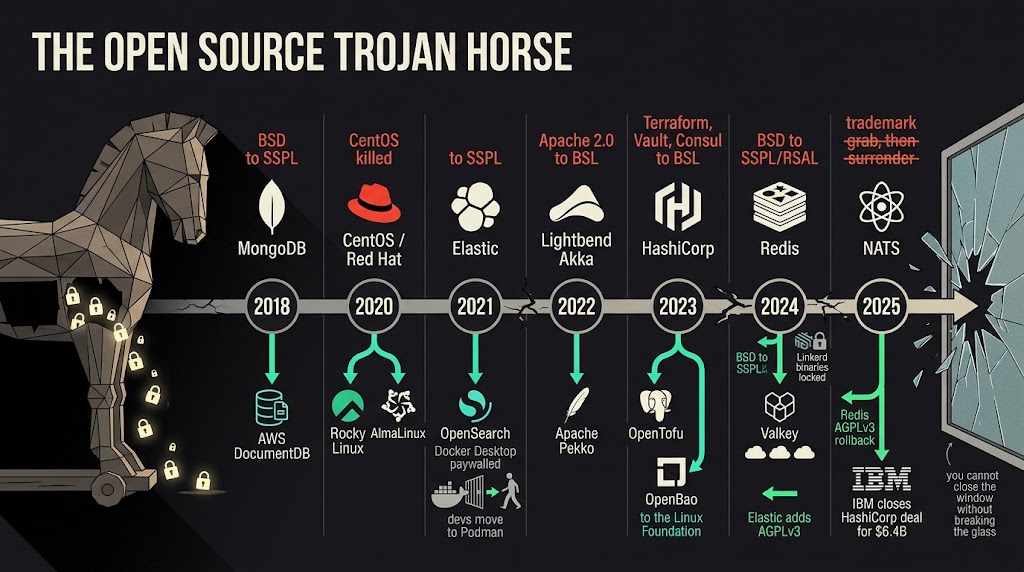
The open source trojan horse timeline

The bait-and-switch problem

To be clear: building closed-source or source-available software is not bad by itself. Companies have every right to build a profitable business and protect their intellectual property.

Projects like n8n (Fair-code / Sustainable Use License) or Redpanda (Business Source License for the enterprise features) set clear commercial guardrails early in their life. When a company declares its business intentions from day one, developers can make an informed choice about adopting the technology. The expectations are honest and the trust stays intact.

The toxicity starts with the bait-and-switch. The betrayal is when a company uses the open-source wind to become ubiquitous, benefiting from thousands of unpaid community bug reports, third-party integrations and grassroots evangelism, and then locks the gates once it is an industry standard. It is using a community to build your empire, and then punishing that same community for your own failure to build a defensible business model.

A history of fractured communities

When companies change the rules of the game in the middle of the game, it almost always starts an ecosystem war. * 2018, MongoDB's SSPL salvo. MongoDB drops its open-source license for the new Server Side Public License (SSPL), to force cloud providers to open source their underlying management infrastructure. AWS answers with DocumentDB, a proprietary clone. * 2020, the death of CentOS Linux. Red Hat (IBM) abruptly terminates CentOS as a stable downstream clone of Red Hat Enterprise Linux (RHEL). The community forks it immediately, and Rocky Linux and AlmaLinux are born to fill the void. * 2021, the cloud wars escalate. Elastic moves Elasticsearch to the SSPL to fight AWS. AWS forks the code into OpenSearch and the ecosystem splits. At the same time, Docker puts Docker Desktop behind a paywall for large companies, and many developers move to alternatives like Podman. * 2022, Lightbend locks down Akka. Lightbend abandons Apache 2.0 for the Business Source License (BSL) in the very popular Akka framework. The Apache Software Foundation hosts the community fork, Apache Pekko. * 2023, the infrastructure shock. HashiCorp moves its entire suite (Terraform, Vault, Consul) to BSL. The infrastructure community revolts, and a coalition of vendors forks the code into OpenTofu (Terraform) and OpenBao (Vault), both handed to the Linux Foundation for neutral stewardship. * 2024, the cache crisis and the binary paywalls. Redis abandons its BSD license for a dual SSPL/RSALv2 model, and the Linux Foundation's Valkey fork appears almost immediately, backed by AWS, Google and Oracle. Elastic goes in the other direction and adds an AGPLv3 option to Elasticsearch. Separately, Buoyant keeps the Linkerd code in the CNCF but puts the stable binaries behind a paywall. * 2025, the NATS standoff and the great rollback. Synadia tries to pull NATS out of the CNCF using a trademark loophole, and surrenders after a lot of pushback. Redis, watching how many enterprises had already moved to Valkey, reverses course and adds the OSI-approved AGPLv3 option. IBM closes the HashiCorp acquisition for $6.4B and keeps the BSL, while OpenTofu keeps growing.

The end of the single-vendor monopoly

The era of the single-vendor open-source monopoly is dead. Today, when a company tries a rug pull on a foundational tool, the ecosystem does not only complain, it mobilizes. Cloud providers, competitors and burned developers fund foundation-backed forks and move the engineering talent away from the original creator.

If a company wants to build proprietary software, it should do it from the start. But if it decides to ride the open-source wind to the top, it is learning the hard way that it cannot suddenly close the window without breaking the glass.

AWS and DuckDB: a Wild West Story

On August 26, DuckDB announced that DuckLabs is joining AWS as a new subsidiary. It is big news in the data world. The internet is already preparing the funeral, although "AWS bought DuckDB" is not quite correct.

DuckDB is the open-source database. DuckLabs is the Amsterdam company that employs many of the main DuckDB contributors. The DuckDB Foundation owns the core intellectual property. According to the announcement, DuckDB, DuckLake, Quack and the extensions will remain open source under the MIT license.

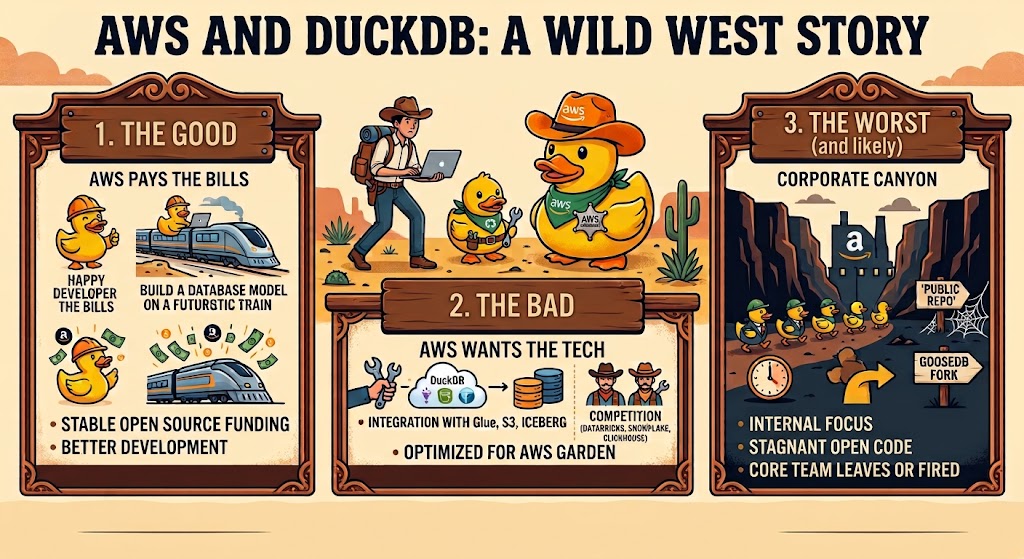
So, should we worry? Of course we should. We are engineers. I have three theories.

opencode Loop

1. The good theory: AWS will pay the bills

DuckDB is used everywhere: on laptops, in notebooks, CI pipelines and data products. It is small, fast and can read formats like Parquet and Iceberg. But maintaining a project like this is not free. You need engineers, testing, releases and support.

With AWS money, the DuckDB team may be able to spend more time building the database and less time finding funding or doing consulting work. That could be very good for us. We get a better-funded open-source project, and AWS pays the bill. Finally, someone else is buying the coffee.

The Foundation and the MIT license also offer some protection. AWS cannot simply take the existing code and make it private tomorrow. At least not without making the lawyers and the internet very busy.

2. The practical theory: AWS wants the technology

AWS has many data services, but the competition is strong. Databricks, Snowflake, ClickHouse, Trino and others are moving fast. AWS also has a lot of services, so adding one more to the menu should be easy, right?

DuckDB is interesting for AWS because it is not another cloud warehouse. It can run inside an application, on a laptop or close to the data. The DuckLabs team's experience could help AWS with local analytics, Glue, S3, Iceberg and other data services.

This could be useful. Better integration with AWS is not automatically bad. The problem starts if DuckDB becomes much better inside AWS than everywhere else. The community needs a tool that works well across clouds, not only in one AWS garden. Otherwise the duck may become free, but only after accepting 37 IAM permissions.

3. The bad theory: the corporate machine

The biggest risk is not that AWS closes DuckDB. The MIT license protects the existing code. The real risk is that the core engineers slowly stop working on the public project and focus on internal AWS priorities.

The code can remain open source and still become less useful. Releases can slow down. Important extensions can focus on AWS. The project can become less friendly to people on other clouds. And some engineers could leave to start a new database called GooseDB.

This is why the next few months matter more than the announcement. I will watch the release pace, GitHub activity, support for non-AWS environments and what the DuckDB Foundation actually does. Also, how many times AWS says "customer-centric" in the next press release.

What should we do?

For now, nothing dramatic. Keep using DuckDB if it works for you. It is still a great option for local development, homelabs, CI/CD and analytics workloads. No need to migrate everything to Spark just because a slide deck said "synergy".

But keep your architecture portable:

  1. Store data in open formats like Parquet or Apache Iceberg.
  2. Keep transformation logic separate from the database engine.
  3. Pin DuckDB versions in CI and test upgrades.
  4. Do not depend too much on new AWS-only features before we know how portable they are. "Portable" should mean more than "works in three AWS regions".

If things go wrong, we should be able to change the compute engine without moving all our data and rewriting everything.

My thoughts

I do not think this is a reason to panic. It can give DuckDB more money and more engineers. It can also bring more AWS influence into the project. Both can be true. The cloud can fund the duck and still try to sell us a duck-shaped subscription later.

The best plan is simple: keep using DuckDB, avoid unnecessary lock-in and watch the real work instead of guessing from headlines. Keep a backup plan, because "we can migrate later" is the most popular bedtime story in data engineering.

For now, the more accurate headline is:

DuckLabs is joining AWS. DuckDB is still open source, and the interesting part is what happens next.

Sources

Understanding the AI Agent Harness

Large Language Models (LLMs) like Claude Opus 5, GPT-5.6, or DeepSeek V4 are exceptional at reasoning, but they are fundamentally stateless text generators. They cannot directly view your repository, modify files on disk, or run your unit tests. An LLM acts as a central processor without operating system access: it generates code, but it lacks the execution layer needed to verify or deploy that code.

To transform an LLM into a fully functional coding assistant like opencode, you need an Agent Harness.

The harness is the dedicated runtime environment wrapping around the model. While the model handles high-level reasoning and decision-making, the harness acts as the scaffolding—managing execution loops, parsing structured tool requests, validating terminal outputs, preserving context across steps, and enforcing safety guardrails.


The Execution Engine: Inside the opencode Loop

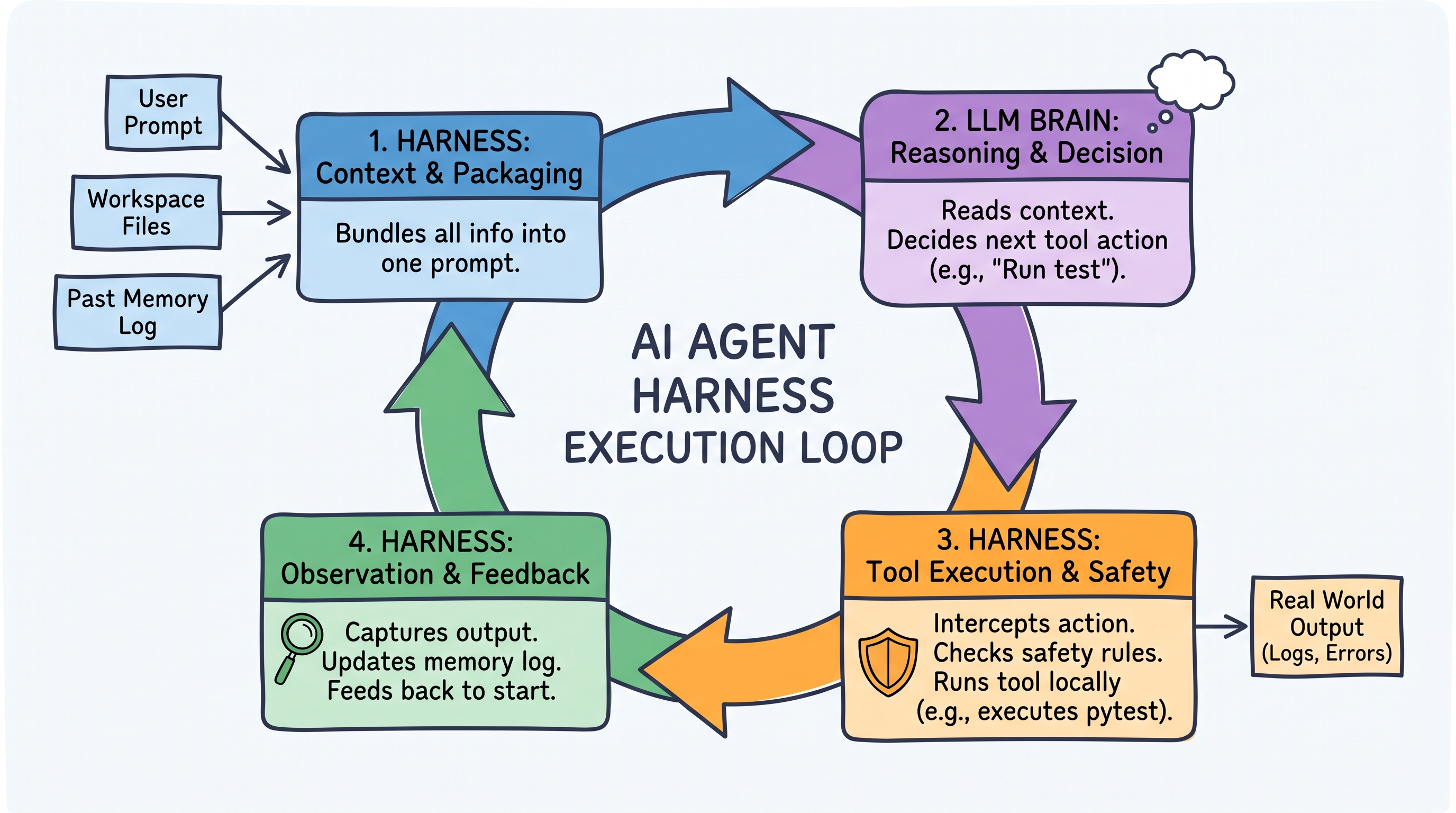
When you issue a command like "Refactor auth.ts to use JWT tokens and run npm test," the opencode harness takes over. It manages the task through an iterative, multi-step execution lifecycle designed to achieve verifiable results.
opencode Loop

Step 1: Context Packaging & Workspace Normalization

Because LLMs retain zero state between API calls, the opencode harness rebuilds the model's memory on every cycle. Before making a request, it collects:

  • Workspace Tree: The repository layout, discovered through the glob, grep, and bash tools.
  • Active Artifacts: The target code files (src/auth.ts, tests/auth.test.ts), read via the read tool.
  • Durable History: Previous turns, compacted or pruned when the session approaches the model's context window, keeping recent actions fresh without token bloat.

Step 2: LLM Reasoning & Tool Contract Emission

The model receives the context bundle, analyzes the refactoring goal, and plans its approach. Crucially, the model does not edit files directly. Instead, it emits a strict, machine-readable tool call in JSON format (e.g., calling read, edit, or bash).

Step 3: Interception, Safety Checks, and Tool Dispatch

The opencode harness captures the model's tool call request and validates it against the configured permissions before execution:

  • Safety Interception: Every tool is gated by a permission rule resolving to allow, ask, or deny. Dangerous shell commands (unapproved file deletions, force pushes) are blocked outright or escalated to the user for confirmation.
  • Local Execution: Once validated, the harness executes the action on your machine—applying an edit, reading a directory, or running npm test in a shell it controls.

Step 4: Observation Capture and Session Persistence

After the tool runs, the harness captures the exact output (stdout and stderr), test results, and exit codes. It appends them as a fresh "Observation" to the context for the next turn, and persists the whole session to disk—by default as JSON under ~/.local/share/opencode/storage/ (session/, message/, part/), so a session survives a restart.


How It's Coded: Inside opencode's Architecture

opencode is a TypeScript monorepo running on Bun. Its harness lives in a local client-server runtime: a server process owns the agent loop, tool execution, session persistence, and MCP connections, and exposes it over HTTP + SSE. Every front end—the terminal UI, the desktop app, the VS Code and Zed extensions—is just a client of that server, which is also what the @opencode-ai/sdk package talks to.

1. Markdown-Driven Agent Declarations

opencode uses declarative Markdown files with YAML frontmatter to define agent personas, assigned LLM providers, and permissions. The agent's name comes from the file name (.opencode/agent/opencoder.md):

---
description: Specialized developer agent for multi-file refactoring
mode: subagent
model: anthropic/claude-opus-5
temperature: 0.1
permission:
  edit: ask
  webfetch: deny
  bash:
    "*": ask
    "npm test": allow
    "git diff": allow
    "git log*": allow
    "rm -rf *": deny
    "git push --force*": deny
---

You are an expert developer. Always create a step-by-step plan before writing code.
Run tests after applying edits to verify correctness.

Note the field is permission (singular), and each entry maps to allow, ask, or deny—bash additionally accepts glob patterns per command. The older tools: [...] array is deprecated in favour of these permission rules.

2. Safety Interceptors & Hooks (@opencode-ai/plugin)

Custom guardrails and workspace rules are implemented via opencode's TypeScript plugin API. A plugin is a function that receives the runtime context and returns a map of lifecycle hooks; tool.execute.before fires before a call reaches the operating system, so throwing from it aborts the tool:

import type { Plugin } from "@opencode-ai/plugin"

export const SecurityGuardrails: Plugin = async ({ client }) => {
  return {
    // Intercept tool calls before execution
    "tool.execute.before": async (input, output) => {
      if (input.tool === "bash") {
        const cmd = output.args.command as string

        // Block dangerous commands programmatically
        if (cmd.includes("rm -rf") || cmd.includes("DROP DATABASE")) {
          throw new Error("Harness Error: command violates security policy.")
        }
      }
    },

    // React to the result of an edit
    "tool.execute.after": async (input, output) => {
      if (input.tool === "edit" || input.tool === "write") {
        await client.app.log({
          body: {
            service: "security-guardrails",
            level: "info",
            message: `File modified by ${input.tool}`,
          },
        })
      }
    },
  }
}

The available hooks cover far more than tools: file.edited, lsp.client.diagnostics, permission.asked, session.compacted, session.idle, and shell.env, among others.

3. Context Compaction

The harness watches token usage for the active session and summarizes history before it overflows the context window. This is configuration, not code you write, in opencode.json:

{
  "$schema": "https://opencode.ai/config.json",
  "compaction": {
    "auto": true,
    "prune": false,
    "reserved": 10000
  }
}

auto (default true) compacts the session automatically when the context fills, prune drops old tool outputs to reclaim tokens, and reserved keeps a token buffer so the compaction request itself never overflows.

4. The Execution Engine Loop

Conceptually, every agent harness—opencode included—runs the same loop. The pseudo-code below is illustrative, not opencode's actual API:

async function harnessLoop(session, initialPrompt) {
  session.append({ role: "user", content: initialPrompt })

  while (true) {
    // 1. Context check & auto-compaction
    if (session.nearContextLimit()) {
      session.compact(await session.summarize()) // Retains goals, drops raw logs
    }

    // 2. Query the LLM provider (Anthropic, OpenAI, DeepSeek, ...)
    const response = await session.provider.generate({
      messages: session.messages,
      tools: session.tools, // Built-in tools + MCP tools
    })

    // 3. Exit when the model stops asking for tools
    if (!response.toolCalls.length) return response.text

    // 4. Dispatch tool calls through the permission and hook layers
    for (const call of response.toolCalls) {
      try {
        await session.hooks.run("tool.execute.before", call)
        await session.permissions.check(call) // may block or ask the user
        const result = await session.executeTool(call)
        session.appendObservation(call.id, result)
      } catch (error) {
        // Errors are observations too — the model reads them and retries
        session.appendObservation(call.id, `Error: ${error.message}`)
      }
    }
  }
}

Driving the real loop from your own code means talking to the server through the SDK:

import { createOpencodeClient } from "@opencode-ai/sdk"

const client = createOpencodeClient({ baseUrl: "http://localhost:4096" })

const session = await client.session.create({
  body: { title: "Refactor auth to JWT" },
})

const result = await client.session.prompt({
  path: { id: session.id },
  body: {
    model: { providerID: "anthropic", modelID: "claude-opus-5" },
    parts: [{ type: "text", text: "Refactor src/auth.ts to use JWT and run npm test" }],
  },
})

// Stream everything the harness does — tool calls, diffs, permissions
const events = await client.event.subscribe()
for await (const event of events.stream) {
  console.log("Event:", event.type, event.properties)
}

Deep Dive: Key Subsystems of opencode's Harness

To maintain stability across complex, multi-turn coding sessions, opencode relies on several subsystems beyond the basic loop:

  • Model Context Protocol (MCP) Clients: External integrations are declared explicitly in the mcp block of opencode.json, either local (spawned as a process over stdio) or remote (reached over HTTP). Their tools then appear to the agent alongside the built-in ones.
  • LSP Integration: The harness talks to local language servers and surfaces diagnostics after edits, both through the lsp.client.diagnostics plugin event and an experimental lsp tool for code intelligence.
  • Lenient Edit Application: The edit and apply_patch tools apply changes by matching and replacing exact text, with deliberately forgiving matchers (whitespace-insensitive, block-anchor based) to absorb the small inaccuracies models make when reproducing a search string. Combined with the edit permission, this keeps writes reviewable instead of blind.

Harness vs. Model vs. UI: A Clear Separation

Understanding modern AI architecture requires distinguishing between these three layers:

Component Responsibility Examples in opencode
LLM (The Brain) Language processing, logic, planning, and tool request generation. Claude Opus 5, GPT-5.6, DeepSeek V4
Harness (The Engine) Execution loop control, context packaging, file system I/O, tool execution, permission checks, persistence. opencode server (agent loop, plugins, JSON session storage, MCP clients)
UI (The Interface) Rendering diffs, displaying terminal outputs, receiving user prompts. Terminal TUI, desktop app, VS Code / Zed extensions—all HTTP + SSE clients

By surrounding the language model with an Agent Harness, tools like opencode turn raw LLM intelligence into a usable developer tool—combining reasoning flexibility with permissioned, observable, and verified code execution.
References

Journey to Datahub.local

Hey there! If my previous post, Embracing the Challenge, you know I’m on a mission in 2024. The quest? Crafting my own Data Platform from scratch called Datahub.local. It’s not just about data – it’s about diving headfirst into the unknown, learning, experimenting, and enjoying the ride. In this article, we're going to map out the game plan for this adventure.

 Journey to Datahub.local

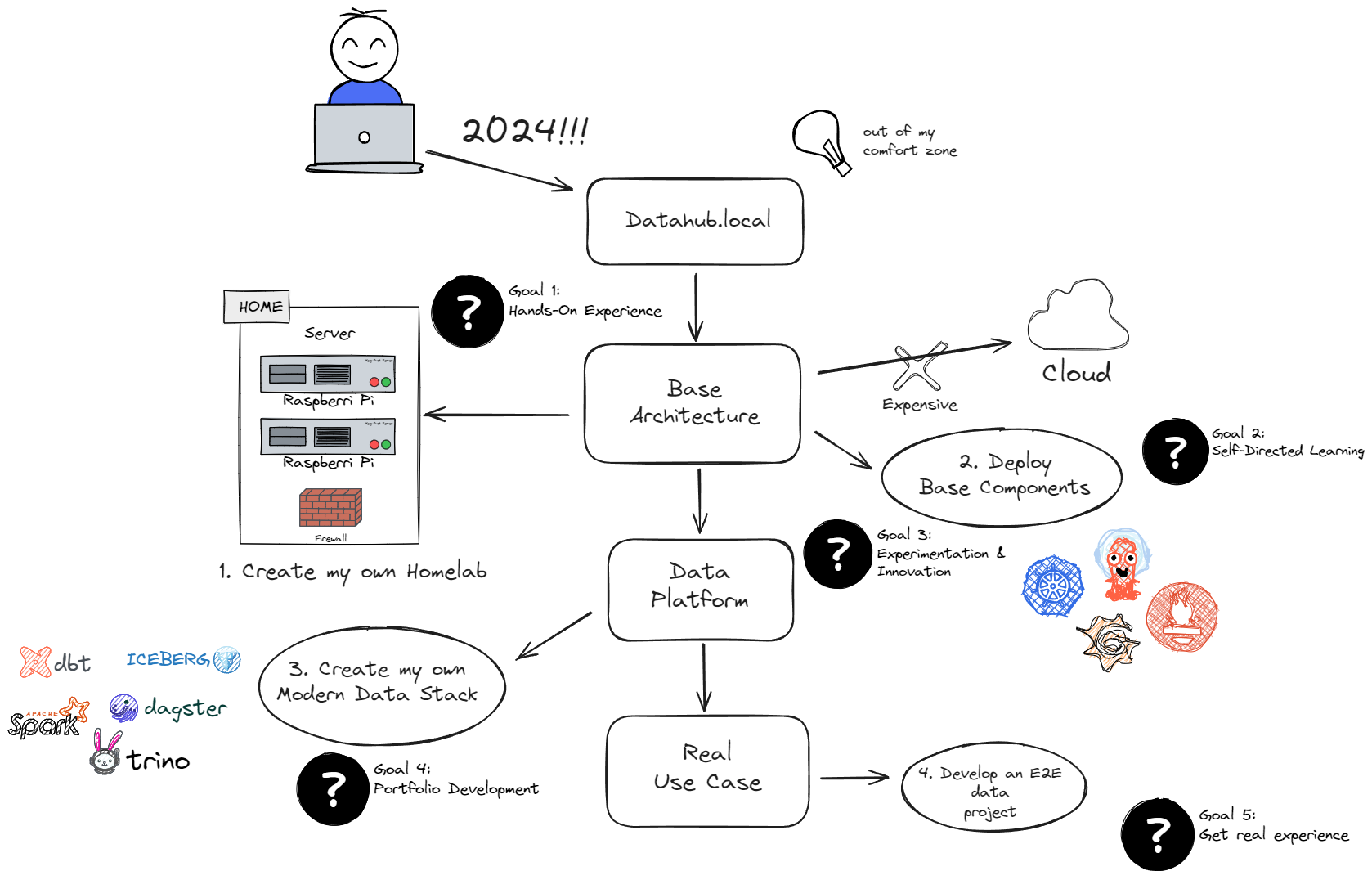
Goals

Embarking on this project requires clear objectives. Let's delve into the goals that will shape my journey.

  1. Hands-On Experience: Dive into practical applications to solidify learning.
  2. Self-Directed Learning: Take charge of my educational path and explore diverse aspects of data management.
  3. Experimentation & Innovation: Encourage creative problem-solving and novel approaches.
  4. Portfolio Development: Build a showcase of skills and projects for professional growth.
  5. Real Experience: Implement the acquired knowledge in real-world scenarios.

What’s the game plan?

With the goals established, it's time to devise a concrete plan that will guide my efforts and actions.

  1. Create my own Homelab: Opt for a cost-effective approach by building a Homelab using small ARM devices, steering clear of excessive cloud expenses.
  2. Deploy Base Components: Establish the foundation for the Data Platform with a Kubernetes cluster. Bootstrap it with DevOps components like ArgoCD, Prometheus, Grafana, etc., ensuring security and performance.
  3. Build the Data Platform: Design and deploy a tailored Modern Data infrastructure, aligning with personal requirements and preferences.
  4. Develop an E2E use case: Develop a meaningful data project to gain practical experience and evaluate the strengths and weaknesses of the new tools. Move beyond the traditional "hello world" approach.

Principles

Finally, every project needs a compass. So, here are some principles to keep things on track and fun.

  • Learn and Enjoy: Prioritize the enjoyment of the learning process.
  • Set Budget and Time Constraints: Be proactive by defining a budget and timeframe, allowing for efficient progress.
  • Flexibility: Postpone tasks that don't contribute to enjoyment or learning.
  • Innovation: Embrace new components, software, or techniques, even if they aren't the best – the goal is to innovate.

And there you have it, folks! This sets the stage for my project. Next up, I'll spill the tea on the hardware I've snagged as I gear up for the exciting phase of implementation. Stay tuned for the next update!

Embracing the Challenge

Embracing the Challenge

With over 15 years as a software engineer, my journey has been a rollercoaster of jobs across various companies and teams — some great, some not so much. One revelation that I had is how fast the technology evolves. In just a few short years, your tech portfolio can become outdated, a relic of a bygone era. Although I've never considered myself a genius, what I do possess is an unwavering determination and consistency. Identifying my weaknesses has been key, whether in personal growth or, in this context, keeping up to date.

As explained before, change is the only constant in the IT work and you must adapt to it, especially from a technological standpoint. Over the past decade, I dedicated significant time to staying current — a pursuit that has proven both gratifying and demanding. The knowledge acquired has empowered me to accomplish tasks that seemed unimaginable just a year earlier. The magic happens when you step out of your comfort zone.

Here's a brief compilation of activities to help you step outside your comfort zone:

  • Seek Feedback: Actively gather feedback from peers to identify areas for improvement.
  • Explore New Opportunities: If growth stagnates, don't hesitate to explore new job opportunities or challenges.
  • Never Stop Learning: Learning is the lifeline of our industry. Constantly evolve by staying informed and acquiring new skills.

And speaking of learning, here are some effective ways to do it:

  • Stay Updated: Engage with relevant sources such as Reddit groups, tech personalities, or media (YouTube channels, podcasts).
  • E-Learning and Reading: Enroll in courses on e-learning platforms or dive into insightful books. These are particularly beneficial for beginners.
  • Certifications Matter: Pursue certifications that are in high demand. It's a challenging journey but adds valuable personal experience.
  • Dive into New Projects: Participate in open-source initiatives or start your projects for a more hands-on learning experience.

As we enter the year 2024, I feel the need to take on something distinct, personal, and significant — an activity that propels me far beyond my comfort zone. Hence, I would like to start a new project called Datahub.local. Over the upcoming months, my goal is to conceive, create, and sustain a personalized Data Platform that can be operated within the confines of my home. This will afford me the opportunity to engage in exploration, experimentation, and, most importantly, learn from failures. Additional details will be shared in forthcoming articles.

Datahub.local

So, buckle up, because my new journey of reinvention has just begun.